Kling 3.0 Turbo AI Video Generator
Create short videos from text or a first-frame image. Shape the motion, camera and pacing in 720p or 1080p.
720p from 69 credits for 3 seconds. Review your quote before generating.
Create with Kling 3.0 Turbo
Turn a written scene into a short video, or bring an existing image to life. Turbo gives you text and first-frame generation with flexible clip lengths, so you can explore a product shot, a character movement or a short visual story.
- 720p / 1080p
- Output resolution
- 3–15 seconds
- Whole-second durations
- Text or image
- Two ways to create
Control the scene and the movement
Plan a scene from text
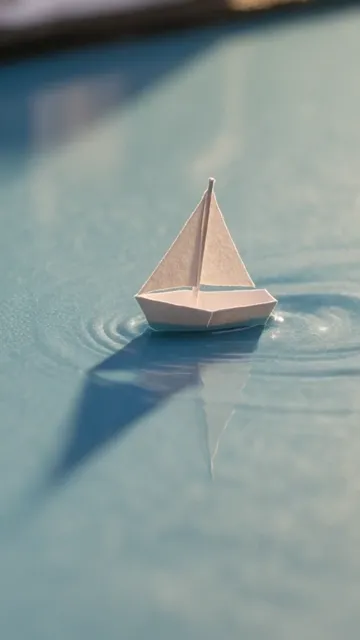
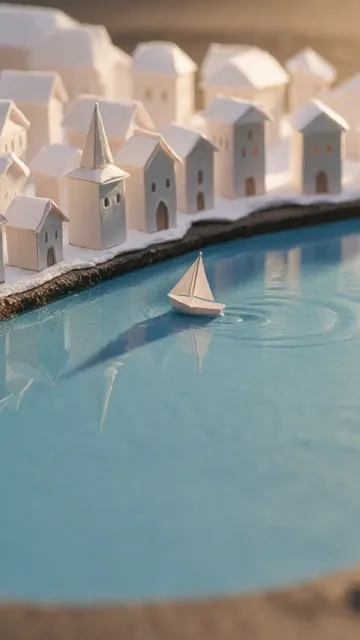
Describe the subject, its action and how the camera should move. In this example, a close-up of a paper boat opens into a wider view of its miniature city. Both frames come from the same generated clip.
For a sequence, write the shots in order and keep the subject and lighting consistent. Choose 16:9, 9:16 or 1:1 before generating. Short, connected actions are easier to follow than several unrelated ideas.
Explore the example prompts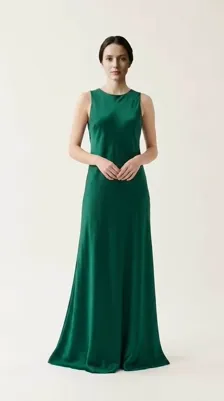
Animate your first frame
Start with a portrait, product photograph or finished composition. The image sets the opening scene; your prompt describes what happens next. The portrait example uses this frame with a gentle walking motion and a backward camera track.
Add one JPG, PNG or WebP under 4MB, with each side at least 300 pixels. The image sets the output ratio, which must be between 0.4 and 2.5. WebP is converted for generation.
Open the Create workspaceHow to make a Kling Turbo video
Describe your shot
Write a prompt above or choose Recreate on a video. For image-to-video, add your own first frame in Create. Example buttons prepare a draft without starting a generation.
Choose your settings
New drafts start at 720p and 5 seconds. Adjust the duration and resolution in Create and review the credit quote. Generate checks your balance before submitting.
Review and download
Watch the completed clip in your conversation or My Assets. Check the motion and ending, download the result, then refine one instruction for your next take.
Prompts for camera movement and continuity
Give the subject one clear action and the camera one direction. Name the details that should stay consistent. A single continuous shot suits a product or portrait; timed shots help plan a change of view. Find more techniques in our video prompt guide.
Paper sailboat and miniature city
Shot 1,2,Macro close-up of a tiny folded paper sailboat drifting across a shallow blue puddle, warm morning light, realistic ripples;Shot 2,3,The camera eases backward to reveal the same paper boat passing a miniature paper city reflected in the water, soft depth of field, cinematic stop-motion texture, no text or logos;
Fashion portrait animated from a first frame
A single continuous cinematic shot. The adult fashion model takes two unhurried steps forward. Keep the outfit, facial features and opening composition consistent. The fabric sways gently and settles as the camera slowly tracks backward. Soft natural studio light, realistic anatomy, no cuts, no text or logos.
Add your own first frame in Create. Your current draft images are kept.
Emerald glass product shot
A slow, continuous camera arc around a single sculpted emerald-green glass perfume bottle on wet black slate. A narrow warm beam sweeps through the glass as a droplet rolls down its curved side, revealing luminous green refractions on the stone. Keep the bottle stationary and centered with generous space above it. Crisp macro product cinematography, dark studio background, realistic glass thickness and fluid motion, vertical composition, no lettering, logos, people or cuts.
Fox crossing a forest stream
A low camera tracks a red fox along a mossy stream bank in an old-growth forest. The fox pauses, then makes one graceful leap across the narrow water and lands on a sunlit rock; small droplets scatter and its tail settles naturally. Keep the entire fox in the vertical frame, with ferns in the foreground and tall cedar trunks receding into mist. Soft morning rays, detailed damp fur, realistic animal anatomy and grounded motion. One continuous wildlife cinematography shot, no cuts, people or text.
Compare Kling models
Choose the controls your scene needs. These are the options available in this site’s integrations.
| Model | Inputs and controls | Output |
|---|---|---|
| Kling 3.0 Turbo | Text or one first frame; shot directions in the prompt | 720p / 1080p, 3–15s |
| Kling 3.0 | Start/end frames, Elements, storyboard and audio controls | 720p / 1080p / 4K, 3–15s |
| Kling 3.0 Omni | Reference images and feature-video guidance | Varies by input mode |
Need an end frame or explicit audio control? Try Kling 3.0. For video references, explore Omni. See Pricing for account options.
Frequently asked questions
What is Kling 3.0 Turbo?
Kling 3.0 Turbo is the speed-focused model in the Kling 3 family. On this site, it creates videos from a text prompt or a single first-frame image. It has its own generation settings and credit quote.
Which resolution and duration can I choose?
Choose 720p or 1080p, with any whole-second duration from 3 to 15 seconds. A new Turbo draft starts at 720p and 5 seconds. For text-to-video, choose landscape, portrait or square. An image-guided video follows the first frame’s proportions.
Can I animate a product photo or portrait?
Yes. Add one first frame and describe how the subject or camera should move. Use a JPG, PNG or WebP image under 4MB, at least 300 pixels on each side, with a width-to-height ratio between 0.4 and 2.5. WebP is converted for generation. You can remove or replace the image before submitting.
How do I write a multi-shot prompt?
Write the shots in order using Shot 1,2,description;Shot 2,3,description; for a five-second sequence. The number after each shot is its duration in seconds. Keep the descriptions focused and make the shot durations add up to your selected length.
Does this Turbo generator offer audio, an end frame or 4K?
Our example results include audio tracks, but this integration has no separate audio-generation control. It provides 720p and 1080p text or first-frame generation. It does not offer an end-frame input, Elements or 4K. Choose Kling 3.0 for its native audio and additional directing controls, or Kling 3.0 Omni for feature-video references.
How are credits charged?
The quote depends on the resolution and video duration. Your balance is checked before starting a task. 720p costs 22.88 credits per second and 1080p costs 28.64. The total is rounded up once: a 5-second clip costs 115 or 144 credits. Review the exact quote in Create. It is not included in Unlimited benefits.
Where can I find and reuse my videos?
A submitted video stays in your Create conversation and My Assets. Once it is ready, you can preview or download it. Recreate fills the editor without generating a video. Existing images are kept; sample images are not added.